
TLS Certificates
A TLS [or SSL] certificate is a digital security key that is used to encrypt the connection between you and the server you're connected to. It's a very secure way to connect to Incorrigo Syx
To find out if you're successfully connected using a certificate, /WHOIS yourself. Your certificate fingerprint will be displayed in the response. If it's not there, then your certificate / settings have not worked

Client certificate fingerprint in /WHOIS
Create a Certificate
To create a certificate for yourself, run our really easy TLS certificate generator
Fill in the details for your certificate, choose .PEM Job done
Just for a laugh, we decided to make the tool for Mac and Linux as well:
Mac / Linux users, just chmod +x and run ./SyxKeys like a pro
When you have created your .PEM file it's all ready to use
Mac OS: b94982d01d71d148020e3b4b571d4cec550e040ff6adbdc692296abb182bed85
Linux x64: 6cda6cde4af3ffdce95e0b10eee7340efe21b18e8ec8326c68946339e3e799a6
Use SyxKeys to Create Certificate
Just in case you need to know how to use SyxKeys, here's a step by step guide
Download & Run SyxKeys
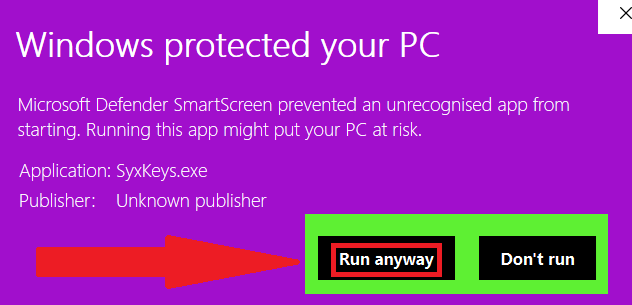
If you are using windows, you will encounter "Windows protected your PC" ... click More info
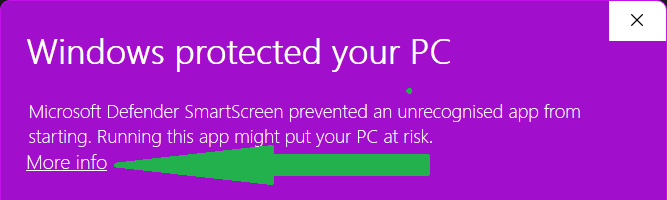
click more info --> run anyway
RSA or Elliptic Curve?
First you will be asked to choose a key type. If you don't know what this means, just choose 'y' and press return

Either choice will give you a very secure client certificate
Enter Your Certificate Details
Your certificate can be used by other things in a number of ways, so enter the details as if someone else would end up reading them

Choose .PEM & filename
Once you have entered all the details, choose 1 for .PEM and enter a filename
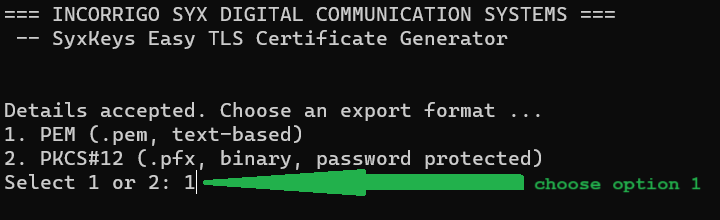
choose .PEM and then enter a filename to save the certificate as

just make sure the filename you enter ends with .pem
Mission Completed
Your certificate will be saved in the same folder as the generator app

You now have a very secure certificate which you can use to connect to Incorrigo Syx. You can use this certificate with any client that supports TLS certificates. You're welcome to use SyxKeys to create some more certificates which you can use anywhere that having a personal TLS [also called SSL] certificate is required
[ Thirsty Work ]